One navigation model
- Up / Down: move backward or forward through choices, messages, pages, or keys.
- Tap: open the selection, run the action, or type the selected key.
- Tap then hold: open native Back/Home and current-task shortcuts.
- Double tap: invoke Even's native exit flow.
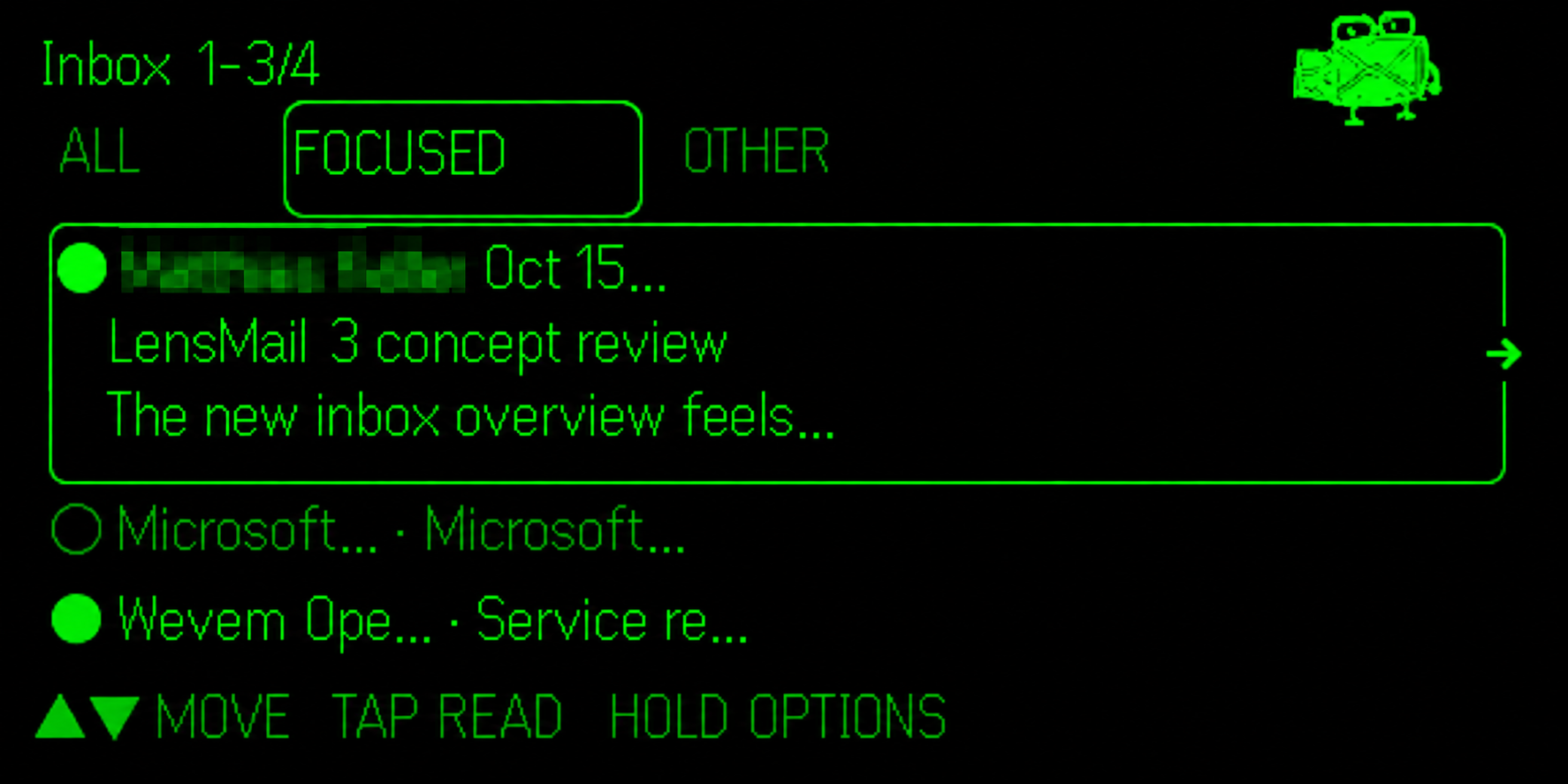
The rectangle and action arrow identify the selected item. The phone companion mirrors the current task, puts Glasses Display first, and keeps Microsoft Connection reachable.
Updating from LensMail 2? Overview Tap now opens the full message directly. Preview remains in Hold. The keyboard now follows Up/Down to choose and Tap to type, just like the rest of the app.
Start with what you need
Home starts on Read Email. It also offers New Email, Refresh Mail, Connection Status, Controls Help, Setup, and About LensMail. About includes Speccy, the version, author, and support address. Tap or Hold's Back/Home returns to the main menu.
Mailboxes and filters
Read Email opens the mailbox menu: Inbox, Focused Inbox, Other Inbox, Drafts, Sent Items, Archive, Deleted Items, and All Folders. All Folders includes personal folders and their subfolders. Microsoft provides Focused/Other classification.
The inbox tabs combine with an independent filter: All Messages, Unread, Flagged, or With Attachments. The unread number describes the whole folder, not just the loaded range. Clear a filter or choose All Inbox if expected mail seems missing.
Mail loads in ranges of 25 with a compact three-message overview. Up/Down move the selection; the selected row expands into a larger preview. Earlier Messages, Newer Messages, and Jump to Range reach other ranges.

Read without accidental actions
Tap an overview message to read it directly. Hold offers Message Preview and Message Actions for triage. Up/Down move through full-message pages. HTML clutter, hidden styles, and tracking elements are removed while international characters and readable content are retained.
End of Email stops further Down gestures. It does not open another message or run an action. Up returns to the final content page. Tap opens Message Actions when you decide to continue. Hold's Back returns to the overview, or to the Conversation list when that is where you opened the message.
Actions include the applicable Mark as Read or Unread, Reply, Reply All, Suggested Replies, Forward, Archive, confirmed Delete, Move to Folder, Flag for Follow-up, Mark Complete, Clear Flag, Message Details, and Conversation where available.
Move to Folder browses the destination hierarchy. A parent offers Move Here as well as subfolders. Details shows recipients, date, flags, and attachment names/sizes; it does not download attachments. Conversation lists related messages returned by Microsoft.
Reply, forward, and continue a draft
Open New Email, Reply, Reply All, Forward, or an existing item in Drafts. LensMail updates an existing draft instead of creating another copy every time. Recipient To, Recipient Cc, Subject, and Message can be edited on the phone or with the ring.
Suggested Replies use local subject/body rules, not a paid AI service. Add a Phrase includes built-in and personal phrases. Save Message as Phrase keeps reusable text on the device for the signed-in account; manage that list in the companion editor.
Recent-recipient suggestions come from loaded mail, not your whole company directory. Matching Recipients in a To/Cc keyboard narrows suggestions using the address currently being entered.
A reversible ring keyboard
Up/Down choose the previous or next key; Tap types. The first tray combines lowercase letters and address shortcuts such as @, periods, common domains, www., and https://. The second tray is uppercase; the third is numbers and punctuation.
Hold prioritizes abc-ABC-@&( to change trays, then Done, Backspace, Delete, and Cancel. Cursor Left/Right, Previous Tray, and Clear Field remain available. Backspace removes the character before the cursor; Delete removes the character at it. International characters remain intact.
Done keeps the field edits. Keyboard Cancel discards that keyboard session only. Cancel Draft leaves the editor; it does not delete a message already saved in Outlook.
Save first, send deliberately
Save to Outlook Drafts never sends. You can reopen the saved message from LensMail or finish it in Outlook.
Review & Send saves and rereads the Microsoft draft, then shows To, Cc, any existing Bcc, subject, and the complete message across review pages. Continue to a separate confirmation: No - Keep Editing is selected by default. Only Yes - Send Email requests delivery.
LensMail rechecks the reviewed recipients and content before sending. If another editor changed the draft, review it again. If the result is uncertain, check Sent Items before doing anything else. LensMail does not automatically retry a send. Microsoft's acceptance is not a guarantee of external delivery.
Reply and forward saves retain the original conversation. Existing draft HTML is retained if its body is unchanged; editing the body replaces it with your plain-text edit. Use Outlook for rich formatting or attachment changes.
My LensMail in 3.0.1
Open My LensMail in the phone's bottom navigation or Home section. It keeps your saved words, frequent contacts, and preferences together without changing the glasses controls.
Saved replies: your wording, ready to reuse
- Choose Saved replies, then New reply.
- Give it a recognizable title, enter your text, and optionally add a category or favorite it.
- Save it, then search or browse the list when writing. Use its insert action to add the text to the current message.
You can keep up to 100 replies, each up to 1,000 Unicode characters. Existing personal phrases are imported for the same account, and their original storage is retained. A saved reply is wording you choose to keep. A Suggested reply is generated by local rules for the current email. Insert text adds reusable wording to the current draft; none of these actions sends a message.
My contacts: frequent people, fewer keystrokes
Choose My contacts, keep On this device selected, then choose New contact. Enter a name and one email address; favorites appear first. You can keep up to 250 local contacts per account. To and Cc add the contact to the appropriate recipient field without sending.
The Outlook source is optional. Connect Outlook contacts requests viewing access; Allow contact editing separately requests viewing and editing. LensMail shows your personal default Contacts folder's entries with email addresses, not every Outlook folder, the company directory, or your phone address book. More loads another page; search covers contacts already loaded.
Keep locally makes a device-only copy. Only Save to Outlook writes a contact to Microsoft. Existing secondary email addresses and other contact fields are preserved. Removing a local contact does not remove an Outlook contact, and LensMail does not offer Outlook contact deletion. If a cloud save is interrupted, check Outlook People before retrying.
Email does not depend on contacts. Decline contact access and continue using email and local contacts. Local contacts are not uploaded automatically. See optional contact setup and contact privacy.
Preferences: a simple signature
Add a sign-off of up to 500 Unicode characters and enable it for new messages if you want. It is off by default and does not rewrite existing replies or forwards.
A phone companion that leaves room
Glasses Display stays first. Home, Read Email, New Email, My LensMail, and Connection remain close in the bottom navigation. Forms scroll to their final fields and buttons, with room for the phone keyboard. On the phone, the full message wraps naturally across the reading pane; the glasses still use their existing pages and controls.
Saved replies, local contacts, and preferences belong to the current account and connection on this device. They are not a cloud backup or cross-device sync. Remove individual saved items in My LensMail; clearing app data or uninstalling may remove them. Signing out is not the same as deleting your saved library. Keep anything irreplaceable elsewhere.
Connect and get help
The Microsoft email connection is unchanged: use Connect M365 for Me, administrator approval when required, or organization-specific setup. Existing saved IDs and sign-in remain in place during an update. No new client secret or mailbox backend is required. Optional contact consent is requested only if you choose it.
LensMail is designed for ring use while the phone stays in your pocket. Keep the phone connected to the glasses with internet access; phone/Even app background policies still apply. If input stalls after sleep, try one new gesture, then reopen the companion if needed.
See Setup, FAQ, or Support. Review the Privacy Policy and Terms of Service before connecting. Never send passwords, client secrets, tokens, authorization codes, or confidential email content to support.